


Selldone for Windows Is Here: Your Business, Closer to You
Your business deserves a workspace that feels at home on your computer. Selldone for Windows brings your store into a dedicated desktop app, with synchronized products, orders, and inventory within reach. Browse downloaded records when your connection drops. Find product details quickly. Move between tasks with tabs and shortcuts. Connect supported AI tools through MCP. We’re opening early access ahead of the official public release, and we’re excited to share a new way to work with Selldone. A Mac version is coming soon, too.
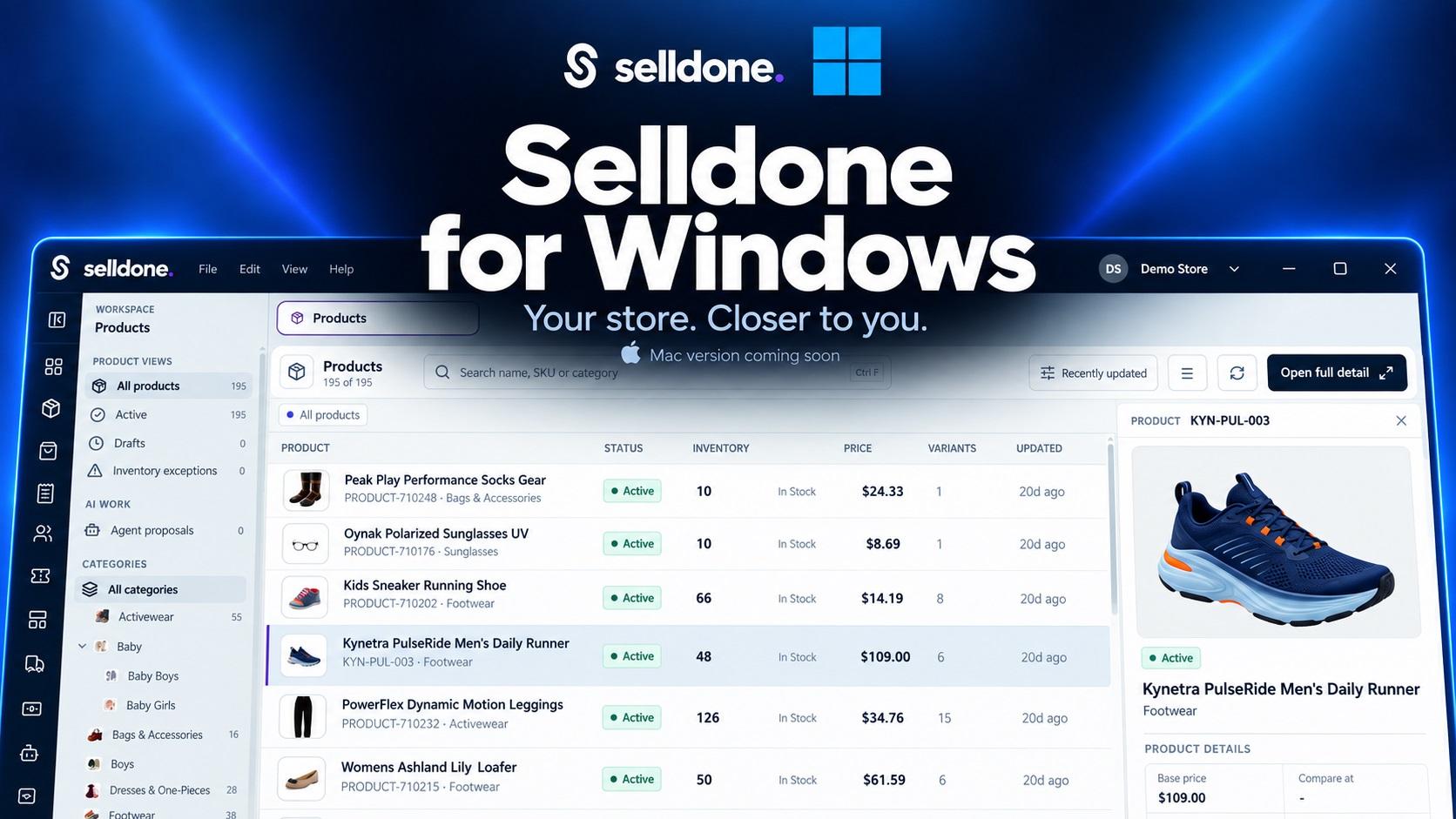
A Dedicated Space for Your Business
Managing a store means switching between details all day. A product needs attention. An order needs checking. A variation needs another look.
Selldone for Windows brings that work into a desktop environment. Your catalog, navigation, and product records sit together in one workspace.
The goal is simple: make everyday information easier to reach, so you can spend more time acting on it.
One workspace for your store.
Clear navigation between records.
Product previews for quick checks.
Tabs to keep your place.
For merchants who spend hours working in Selldone, these small conveniences can make a meaningful difference throughout the day.
Your Information, Available Offline
An unreliable connection should not leave you without access to information you already downloaded.
After signing in and synchronizing your workspace, you can browse locally available business records. That includes downloaded product information and available order and inventory data.
Offline access is especially useful when you’re:
Traveling between locations.
Working with unstable Wi-Fi.
Reviewing your catalog on the move.
Checking records during an outage.
Your local workspace gives you a reference you can return to without loading every record from the server again.
Offline records reflect your last synchronization. Live updates, online operations, and connected AI services still require internet access. Stock and order information may have changed since your last sync.
Find the Right Product Faster
A growing catalog needs more than a long list of product names. You need ways to narrow your search and see useful details quickly.
The product workspace combines images with key information, including prices, status, inventory, and variants.
Use search and category navigation to reach the item you need. Open its preview to inspect the details while keeping the catalog visible.
Search by name or SKU.
Browse your category tree.
Review active products and drafts.
Check prices and stock.
Inspect product variants.
Whether you sell a small collection or manage a broader catalog, a clear view helps you spot what deserves attention.
Give Every Product Its Own Workspace
A product connects to many parts of your business. Its content, variations, inventory, media, and related activity all matter.
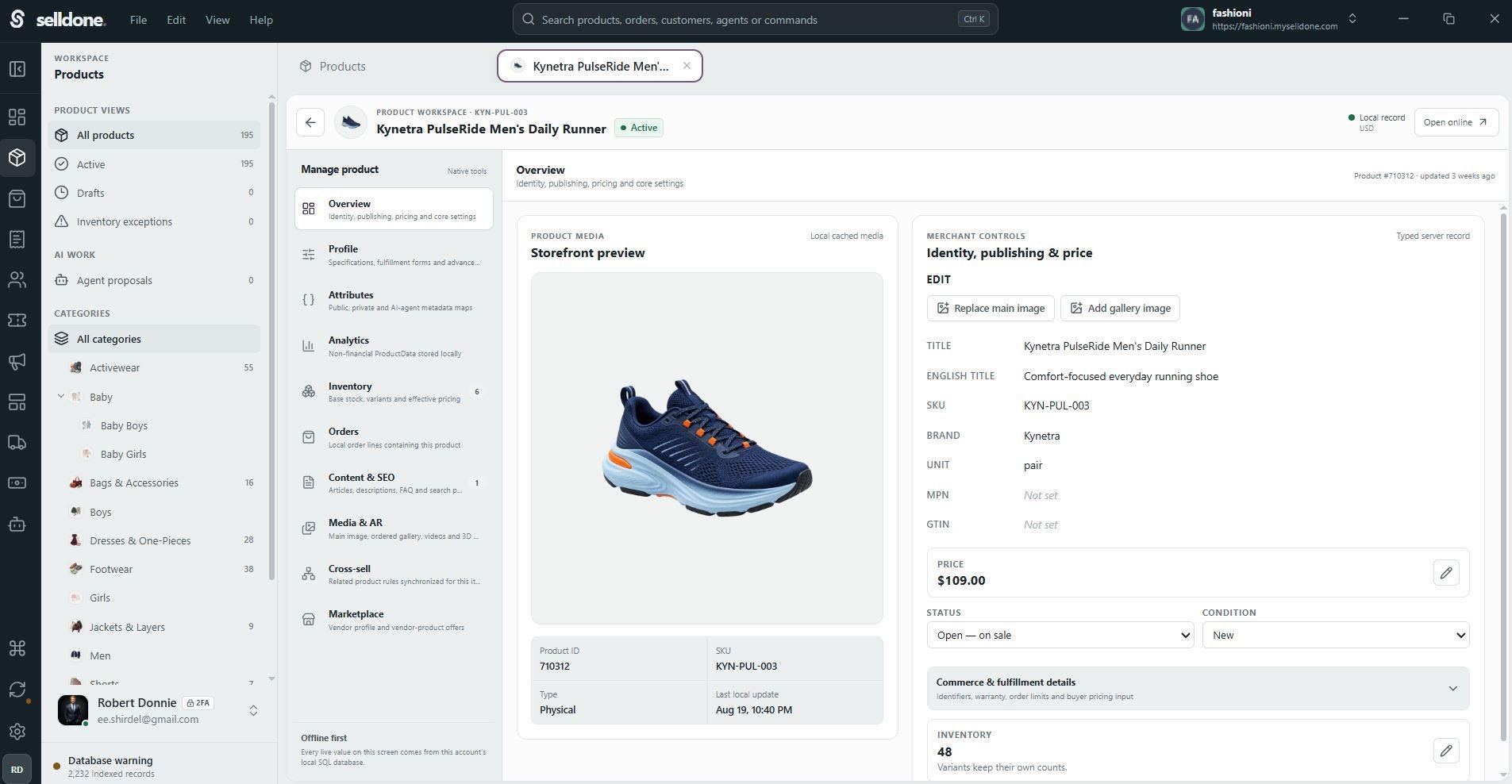
Open a product to explore those areas in a dedicated view. You can move from a quick catalog check into a closer review without losing your place.
The interface brings together areas such as:
Overview and attributes.
Inventory and orders.
Content and SEO.
Media and AR.
Cross-selling and marketplace details.
This makes it easier to understand a product in context. You can review its information, identify gaps, and decide what to improve next.
For example, you might start by checking a product’s variants, then review its description and images. Keeping those details together makes that review easier to follow.
Built for Your Everyday Workflow
Useful workflow improvements often come from small details. Keeping a list open. Switching between records. Finding something without starting over.
Selldone for Windows includes tabs, a persistent sidebar, product previews, and keyboard shortcuts to support those everyday actions.
Global search offers a starting point for finding information and commands. Catalog search helps you focus on specific products.
Keep your place. Open another record. Return when you’re ready.
That flexibility helps when you’re comparing items or moving between a broad catalog review and individual product details.
You can keep the bigger picture in view while giving each item the attention it needs.
Bring AI Closer to Your Store
Through MCP, you can connect supported tools such as Claude, ChatGPT, and Codex to your Selldone environment.
This supports our direction with Genesis: making AI useful in the everyday work of running a business.
With the right connection and permissions, your assistant can work with relevant store context. Ask for help reviewing information, planning improvements, or preparing content.
For example:
“Find products with incomplete descriptions.”
“Suggest a clearer category structure.”
“Help improve this product’s content.”
“Review this collection for consistency.”
These are examples of useful requests. Available actions depend on the connected tools and the access you grant.
The app also includes an area for agent proposals, giving AI suggestions a visible place within your workspace.
The opportunity goes beyond writing individual descriptions. Store context helps make your conversations more specific, so you can focus on the products and decisions that matter to your business.
Start With the Work You Already Do
You do not need a new routine to begin exploring the app. Start with a familiar task, such as finding a product or reviewing its variants.
Getting started follows a short path:
Open the Windows app.
Sign in through your browser.
Choose your shop.
Sync your workspace.
Then explore your catalog. Open a few records. Try the search. See how the desktop experience fits into your day.
Browser-based sign-in means you authenticate through your browser instead of entering your password directly into the desktop app.
Once your workspace is prepared, your synchronized information is ready for you to explore.
Windows First. Mac Is Coming.
We’re starting with Windows, and a Mac version is coming soon.
Our goal is to bring the Selldone desktop experience to more of the computers merchants already use.
Whether your day revolves around catalog management, reviewing orders, or working with AI, we want Selldone to feel like a natural part of your workspace.
Want Early Access?
Selldone for Windows has not yet been officially released to the public. We’re sharing it through early access before the wider launch.
Send an email to this email and ask for the Windows app. We’ll send it to you.
Try it with your store. Explore your synchronized records. Open your product workspaces. Tell us which parts help you most and where you’d like to see improvements.
Your feedback will help us refine the experience as we prepare for the official release.
We’re excited to put this early version in your hands—and to hear how Selldone for Windows fits into your working day.
 Add Comment
Make Your Business Online By The Best No—Code & No—Plugin Solution In The Market.
30 Day Money-Back Guarantee
Create Your E-commerce Store Start now — it's freeSay goodbye to your low online sales rate!