


Advanced Tax System Is Now Live on Selldone — Powered by Stripe Tax
Selling internationally should be exciting, not stressful.
But for many online businesses, tax calculation has always been one of the biggest barriers to growth. Different countries, states, cities, ZIP codes, VAT rules, GST rules, sales tax thresholds, product categories, and service types can make tax setup complicated and time-consuming.
That is why we are excited to announce that Selldone’s Advanced Tax System is now live, powered by Stripe Tax.
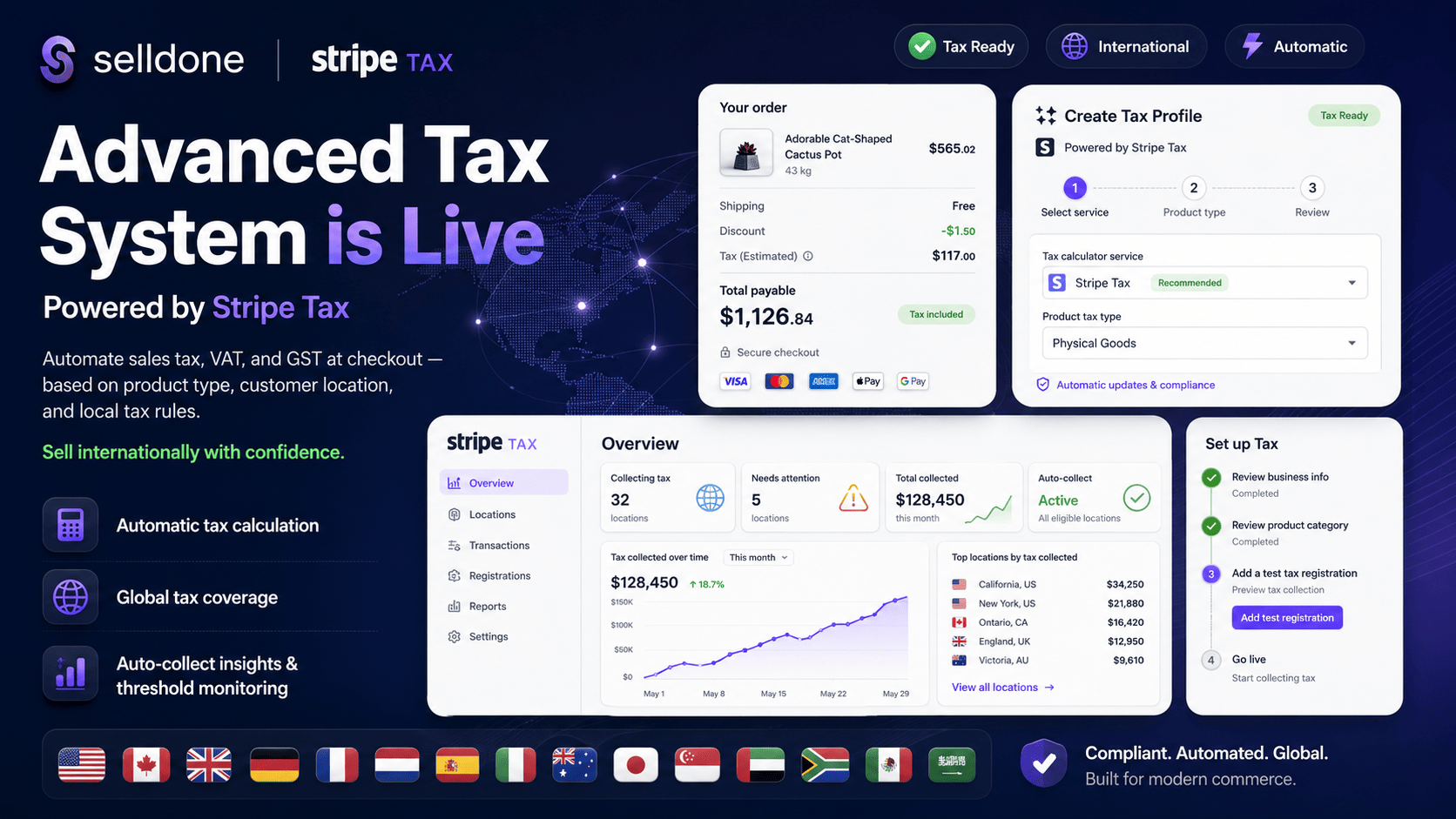
With this new feature, Selldone merchants can automate tax calculation directly at checkout. Instead of manually creating tax rates for different countries, states, cities, or ZIP codes, merchants can use Stripe Tax to calculate the right tax based on:
- 🌍 Customer location
- 📦 Product type
- 🛎️ Service type
- 🧾 Local tax rules
- 🏪 Business location
- ✅ Active tax registrations
Stripe describes Stripe Tax as a solution for automating sales tax, VAT, and GST compliance, including automatic tax calculation based on product type and customer/business location.
Why This Update Matters
Tax complexity can quietly block growth.
Many merchants want to sell internationally, but they hesitate because they are unsure how to handle tax rules in different regions. This update helps remove that friction.
With Selldone’s Advanced Tax System, merchants can now:
- ✅ Sell internationally with more confidence
- ✅ Reduce manual tax setup
- ✅ Show accurate tax amounts at checkout
- ✅ Create a more transparent buying experience
- ✅ Save time on country-by-country tax configuration
- ✅ Support different product and service tax categories
- ✅ Build a stronger foundation for global sales
This means merchants can focus more on selling, marketing, and growing, instead of spending time managing complex tax tables.
Built for Automatic Tax Calculation at Checkout
The new Advanced Tax System is fully connected to the Selldone checkout experience.
When a customer places an order, Selldone can calculate and display tax before payment is completed. This creates a cleaner and more trustworthy checkout flow.
At checkout, the system can consider:
- Customer address
- Billing or shipping location
- Product category
- Product tax profile
- Service type
- Applicable local tax rules
- Tax registration status
- Cross-border transaction rules
For customers, this means they see a clear final payment amount.
For merchants, this means fewer surprises, fewer manual calculations, and better order-level tax visibility.
Powered by Stripe Tax
Stripe Tax helps businesses automate tax calculation and compliance workflows for sales tax, VAT, and GST. It also supports tax calculation across payment flows such as Checkout, Payment Links, invoices, subscriptions, and API-based payment flows.
With Stripe Tax connected to Selldone, merchants can benefit from:
- 🧾 Automatic sales tax, VAT, and GST calculation
- 🌍 Multi-country tax support
- 📦 Product tax code mapping
- 📍 Location-based tax logic
- 📊 Tax threshold monitoring
- 🏪 Tax registration management
- 📄 Tax reporting
- 🛒 Marketplace and platform support through Stripe Connect
Stripe Tax also supports multi-country tax calculation and helps businesses handle international and cross-border transactions.
What Merchants Can Do Now
With this update, Selldone merchants can:
- Enable Stripe Tax inside Stripe
- Enable the Advanced Tax System inside Selldone
- Create tax profiles manually or automatically
- Select Stripe Tax as the external tax service
- Assign product tax types
- Connect tax profiles to products or categories
- Calculate tax at checkout automatically
- Review tax details inside order records
- Monitor tax activity through Stripe reports
This creates a much smoother tax workflow from setup to checkout.
Product-Level Tax Accuracy
Not all products are taxed the same way.
A physical product, digital download, online service, subscription, or booking may have different tax treatment depending on the customer’s location and local tax laws.
Stripe Tax uses product tax codes to help categorize products and services for more accurate tax calculations across jurisdictions.
This is important for Selldone merchants selling:
- 📦 Physical goods
- 💾 Digital products
- 🛎️ Services
- 🔁 Subscriptions
- 📅 Bookings
- 🏪 Marketplace products
- 🎟️ Virtual products
- 🌍 Cross-border orders
Auto-Collect, Threshold Monitoring, and Tax Registrations
One of the most valuable parts of Stripe Tax is that it does more than calculate tax.
Stripe Tax can help merchants monitor where they may need to register for tax collection. Stripe provides dashboard and email alerts when a business might need to register in a location based on tax thresholds.
This helps merchants understand:
- Where they may need to collect tax
- Which locations need attention
- When sales thresholds may create tax obligations
- Which registrations should be added
- Where tax collection can begin
Once a merchant registers in a location, they can add that registration in Stripe to start collecting tax for that location.
In some regions, Stripe Tax also works with filing partners to help automate filing workflows, while Stripe also provides reports for completed tax transactions. Merchants remain responsible for filing and remitting taxes unless they use an applicable filing partner or service.
Better Checkout, Better Trust, Better Growth
A clear checkout experience increases customer confidence.
When customers can see tax calculated accurately before payment, the checkout feels more professional and transparent.
This update helps merchants:
- Reduce checkout confusion
- Avoid unexpected tax changes
- Improve trust with international customers
- Create a more professional payment experience
- Expand into more markets with less operational friction
- Increase global sales opportunities
The result is simple:
- Less manual work
- More accurate tax calculation
- Better customer experience
- More confidence for international selling
- A stronger foundation for business growth
Supported Countries and Regions
Stripe Tax supports tax calculation across many countries and regions. The exact supported product types, tax types, registration rules, and transaction coverage may vary by country, but Stripe provides country-specific guidance for calculation, collection, reporting, and registration requirements.
🇪🇺 European Union
Stripe Tax can calculate tax in all countries in the European Union.
- 🇦🇹 Austria
- 🇧🇪 Belgium
- 🇧🇬 Bulgaria
- 🇭🇷 Croatia
- 🇨🇾 Cyprus
- 🇨🇿 Czech Republic
- 🇩🇰 Denmark
- 🇪🇪 Estonia
- 🇫🇮 Finland
- 🇫🇷 France
- 🇩🇪 Germany
- 🇬🇷 Greece
- 🇭🇺 Hungary
- 🇮🇪 Ireland
- 🇮🇹 Italy
- 🇱🇻 Latvia
- 🇱🇹 Lithuania
- 🇱🇺 Luxembourg
- 🇲🇹 Malta
- 🇳🇱 Netherlands
- 🇵🇱 Poland
- 🇵🇹 Portugal
- 🇷🇴 Romania
- 🇸🇰 Slovakia
- 🇸🇮 Slovenia
- 🇪🇸 Spain
- 🇸🇪 Sweden
🇬🇧 Europe Outside the EU
- 🇦🇱 Albania
- 🇧🇾 Belarus
- 🇧🇦 Bosnia and Herzegovina
- 🇮🇸 Iceland
- 🇲🇩 Moldova
- 🇲🇪 Montenegro
- 🇲🇰 North Macedonia
- 🇳🇴 Norway
- 🇷🇺 Russia
- 🇷🇸 Serbia
- 🇨🇭 Switzerland
- 🇱🇮 Liechtenstein
- 🇺🇦 Ukraine
- 🇬🇧 United Kingdom
Stripe lists these countries in its Europe outside the EU tax collection documentation.
🌏 Asia Pacific and Middle East
- 🇦🇲 Armenia
- 🇦🇺 Australia
- 🇦🇿 Azerbaijan
- 🇧🇭 Bahrain
- 🇧🇩 Bangladesh
- 🇰🇭 Cambodia
- 🇬🇪 Georgia
- 🇭🇰 Hong Kong
- 🇮🇳 India
- 🇮🇩 Indonesia
- 🇯🇵 Japan
- 🇰🇿 Kazakhstan
- 🇰🇬 Kyrgyzstan
- 🇱🇦 Laos
- 🇲🇾 Malaysia
- 🇳🇵 Nepal
- 🇳🇿 New Zealand
- 🇴🇲 Oman
- 🇵🇭 Philippines
- 🇸🇦 Saudi Arabia
- 🇸🇬 Singapore
- 🇰🇷 South Korea
- 🇱🇰 Sri Lanka
- 🇹🇼 Taiwan
- 🇹🇯 Tajikistan
- 🇹🇭 Thailand
- 🇹🇷 Türkiye
- 🇦🇪 United Arab Emirates
- 🇺🇿 Uzbekistan
- 🇻🇳 Vietnam
Stripe lists these countries in its Asia Pacific tax collection documentation.
🌍 Africa
- 🇦🇴 Angola
- 🇧🇯 Benin
- 🇧🇫 Burkina Faso
- 🇨🇲 Cameroon
- 🇨🇻 Cape Verde
- 🇨🇩 Democratic Republic of the Congo
- 🇪🇬 Egypt
- 🇪🇹 Ethiopia
- 🇬🇳 Guinea
- 🇰🇪 Kenya
- 🇲🇷 Mauritania
- 🇲🇦 Morocco
- 🇳🇬 Nigeria
- 🇸🇳 Senegal
- 🇿🇦 South Africa
- 🇹🇿 Tanzania
- 🇺🇬 Uganda
- 🇿🇲 Zambia
- 🇿🇼 Zimbabwe
Stripe lists these countries in its Africa tax collection documentation.
🌎 Latin America and the Caribbean
- 🇦🇼 Aruba
- 🇧🇸 Bahamas
- 🇧🇧 Barbados
- 🇨🇱 Chile
- 🇨🇴 Colombia
- 🇨🇷 Costa Rica
- 🇪🇨 Ecuador
- 🇲🇽 Mexico
- 🇵🇪 Peru
- 🇸🇷 Suriname
- 🇺🇾 Uruguay
Stripe lists these countries in its Latin America and Caribbean tax collection documentation.
🇺🇸 United States and 🇨🇦 Canada
Stripe Tax supports tax calculation in the United States and also supports tax calculation for Canadian federal and provincial jurisdictions.
Canadian jurisdictions listed by Stripe include:
- 🇨🇦 Federal
- 🇨🇦 British Columbia
- 🇨🇦 Manitoba
- 🇨🇦 Quebec
- 🇨🇦 Saskatchewan
How It Works in Selldone
Merchants can set up the Advanced Tax System in a simple flow:
- Go to the Selldone tax settings
- Create a new tax profile
- Choose manual setup or external auto setup
- Select Stripe Tax as the external tax service
- Choose the product tax type
- Add the profile
- Enable Stripe Tax in Stripe
- Add tax registrations where required
- Start calculating tax automatically at checkout
This makes tax setup much easier for merchants who want to sell across regions.
A Major Step for Global Commerce on Selldone
Selldone is built to help businesses sell without unnecessary complexity.
The new Advanced Tax System is a major step toward that mission. It gives merchants a smarter way to handle one of the most difficult parts of ecommerce: tax calculation.
With this update, merchants can:
- Sell to more countries
- Reduce manual tax work
- Improve checkout transparency
- Support different product and service tax types
- Monitor tax obligations
- Build trust with international customers
- Grow with more confidence
Final Thoughts
The Advanced Tax System is now live on Selldone.
Powered by Stripe Tax, this update helps merchants automate tax calculation, reduce operational complexity, and create a better checkout experience for customers around the world.
For businesses that want to sell internationally, this is a major upgrade.
Selldone + Stripe Tax means:
- 🧾 Smarter tax calculation
- 🌍 Easier international selling
- ⚡ Faster setup
- ✅ Better checkout transparency
- 📈 More confidence to grow globally
Advanced Tax System is live.
Powered by Stripe Tax.
Built for modern global commerce.
 Add Comment
Make Your Business Online By The Best No—Code & No—Plugin Solution In The Market.
30 Day Money-Back Guarantee
Create Your E-commerce Store Start now — it's freeSay goodbye to your low online sales rate!