

5 Impressive Selldone Features That Will Level Up Your Online Shop
I’ve been exploring different ways to optimize online selling, and let me tell you—there’s never a dull moment in the world of ecommerce. Selldone, a robust business management system and ecommerce platform, has rolled out a collection of updates that can give any hypothetical brand a serious edge. Whether you’re offering handcrafted items, digital solutions, or creative subscription boxes, these fresh features have the potential to streamline your workflow and provide a top-notch customer experience. Below, I’ll walk you through five game-changing improvements and show you how to put them to work in your online endeavor.
Flexible Variant Displays
Why Variant Display Matters
If you sell products in multiple sizes, colors, or styles, you already know how crucial it is to present these options cleanly. When potential buyers feel overwhelmed scrolling through a complicated list of variations, they might move on before making a purchase. Selldone’s new variant display modes can solve this hassle, letting you tailor how you show choices—from a neat grid layout to a simple dropdown.
Two Approaches for Display
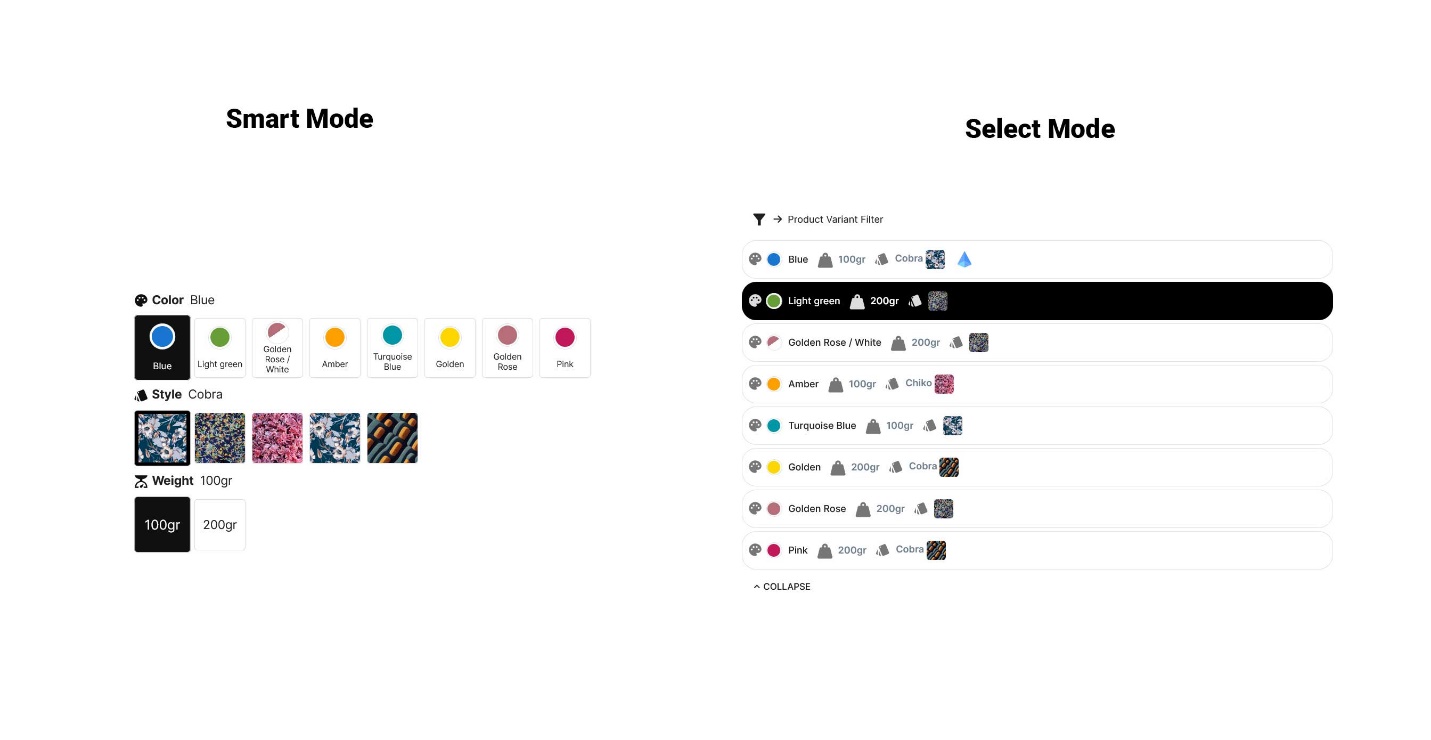
Smart Mode
- Sleek Overview: This layout breaks down each product variation into separate, clickable buttons.
- Ideal For: Items with a handful of variations—like T-shirts (Small, Medium, Large) or a beverage line with a few container sizes.
- User-Friendly: Shoppers can see all the options at a glance and quickly pick what they want.
Select Mode
- Dropdown Simplicity: Consolidates many variations into a single dropdown menu.
- When to Use: Perfect if you offer numerous sizes, materials, or add-ons. Think about a hypothetical candle store with 20 scents in three different jar sizes.
- Clutter-Free: Keeps your product page tidy, even when variations are extensive.
Fast Setup in Your Dashboard
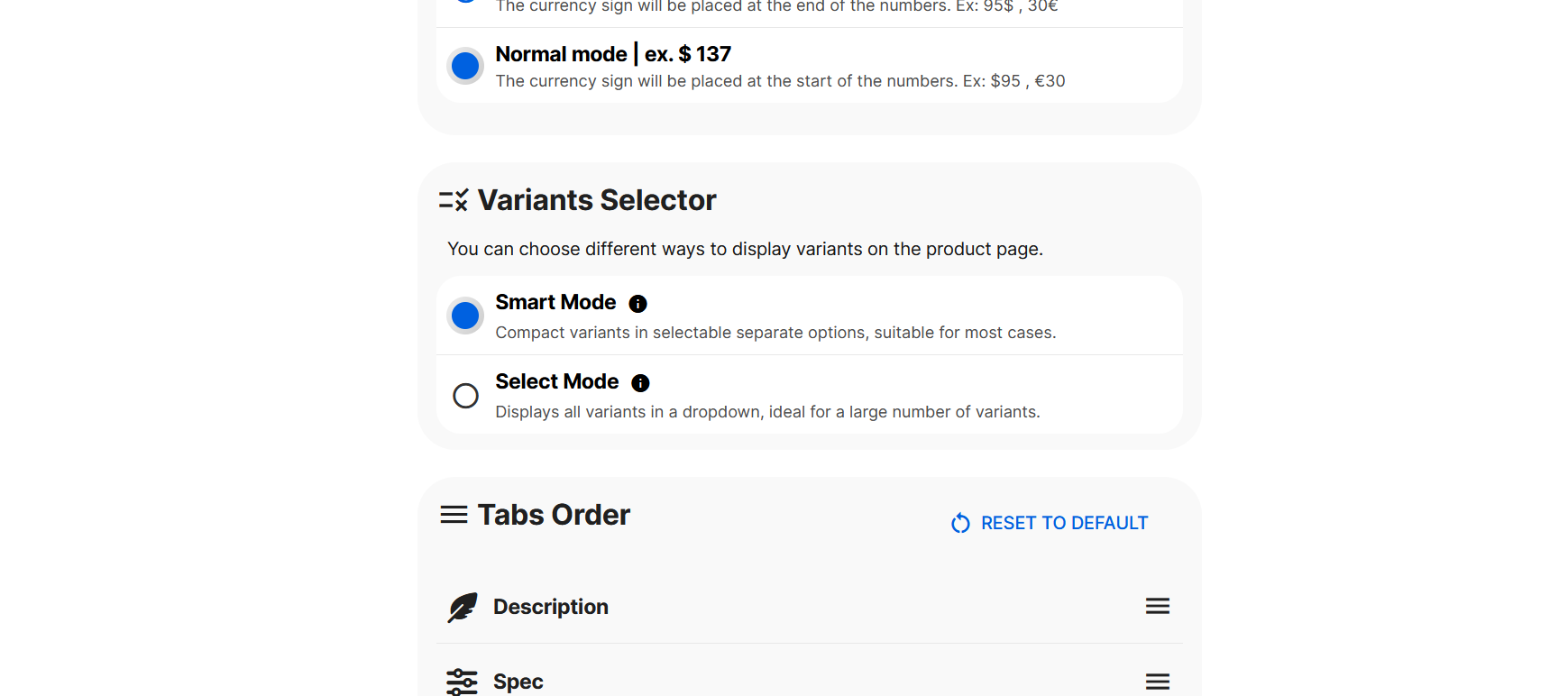
- Go to Shop Dashboard > Settings > Theme > Product Page > Variants Selector.
- Pick Smart Mode if you have relatively few variations or Select Mode if you carry a wide selection.
- Hit Save, and let the new variant presentation elevate your store’s shopping experience.
Custom Input Forms at Checkout
Collect Exactly What You Need
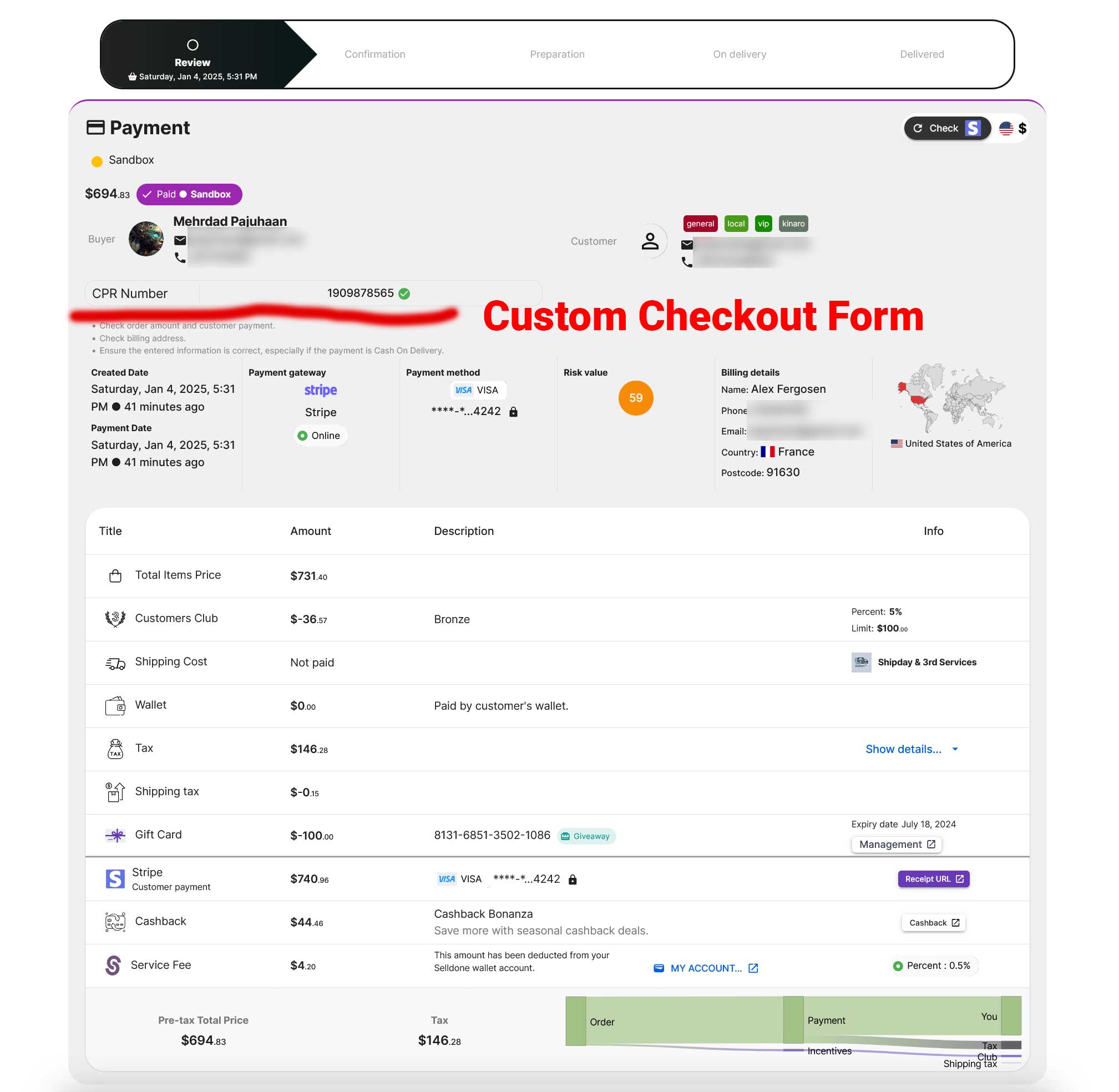
Next up is a feature that can significantly reduce the back-and-forth with customers: custom input forms on the checkout page. Whether you need details like a buyer’s special customization request, gift note, or certain ID requirements for official documentation, now you can integrate custom fields to collect any type of information.
How Custom Forms Help
- Smarter Data Gathering: If you’re shipping internationally, you might need region-specific details. Or if you’re selling digital products, you might want extra info about the buyer’s preferences.
- Streamlined Communication: Get the key information upfront, cutting out the need to follow up via emails or calls.
- Enhanced Professionalism: Custom forms show customers you’re prepared to meet their unique needs.
Putting Custom Forms Into Action
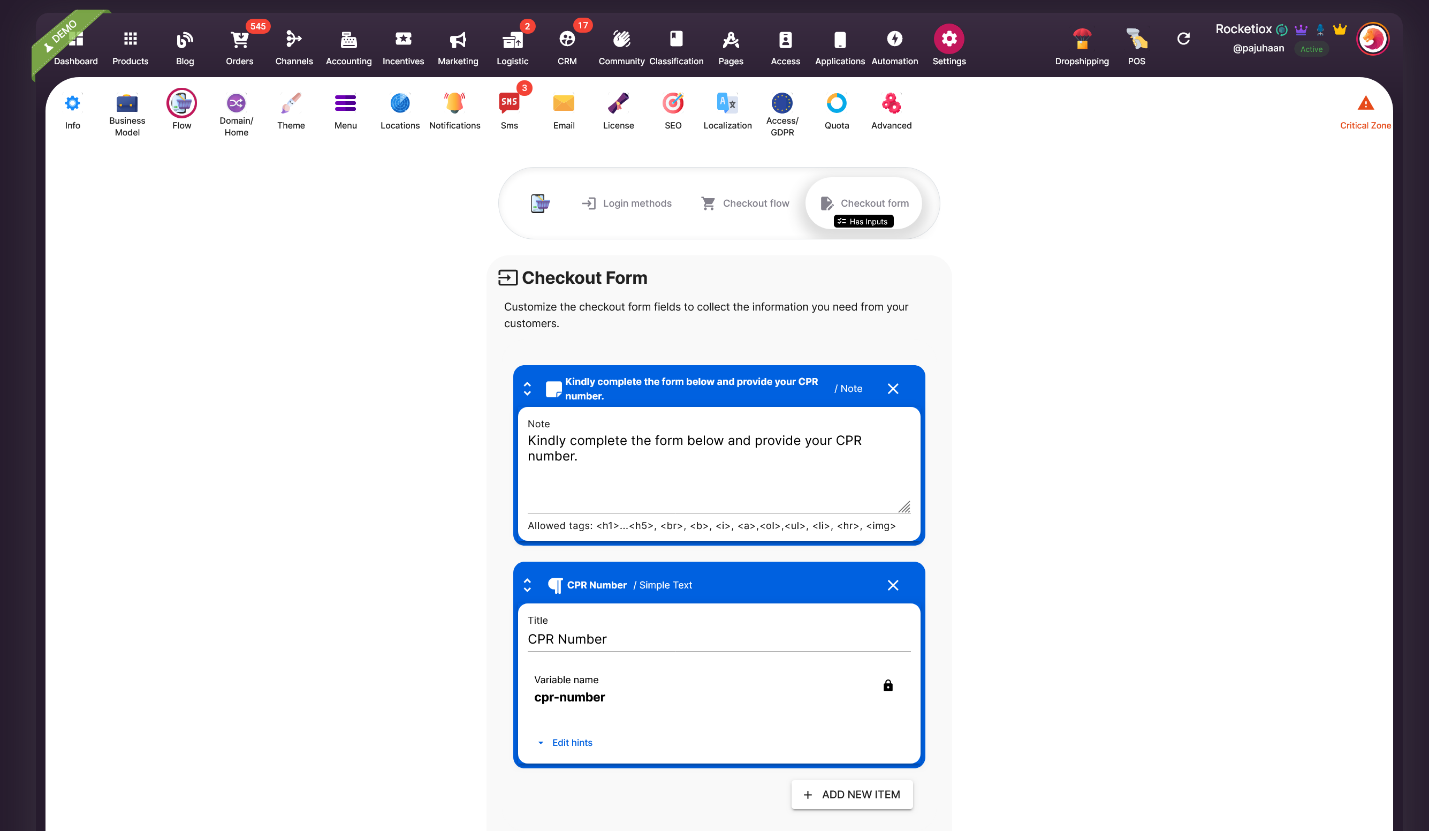
- Head over to Shop > Settings > Flow > Checkout Form.
- Click “Add Fields” and decide which field types—text, checkbox, or dropdown—you need.
- Save your setup. Your newly added fields will be right there on the checkout page for buyers to fill out.
Pro Tip: Always keep your forms concise. Too many fields can deter customers from completing their purchases.
Dedicated Login Page for Users
A One-Stop Welcome Page
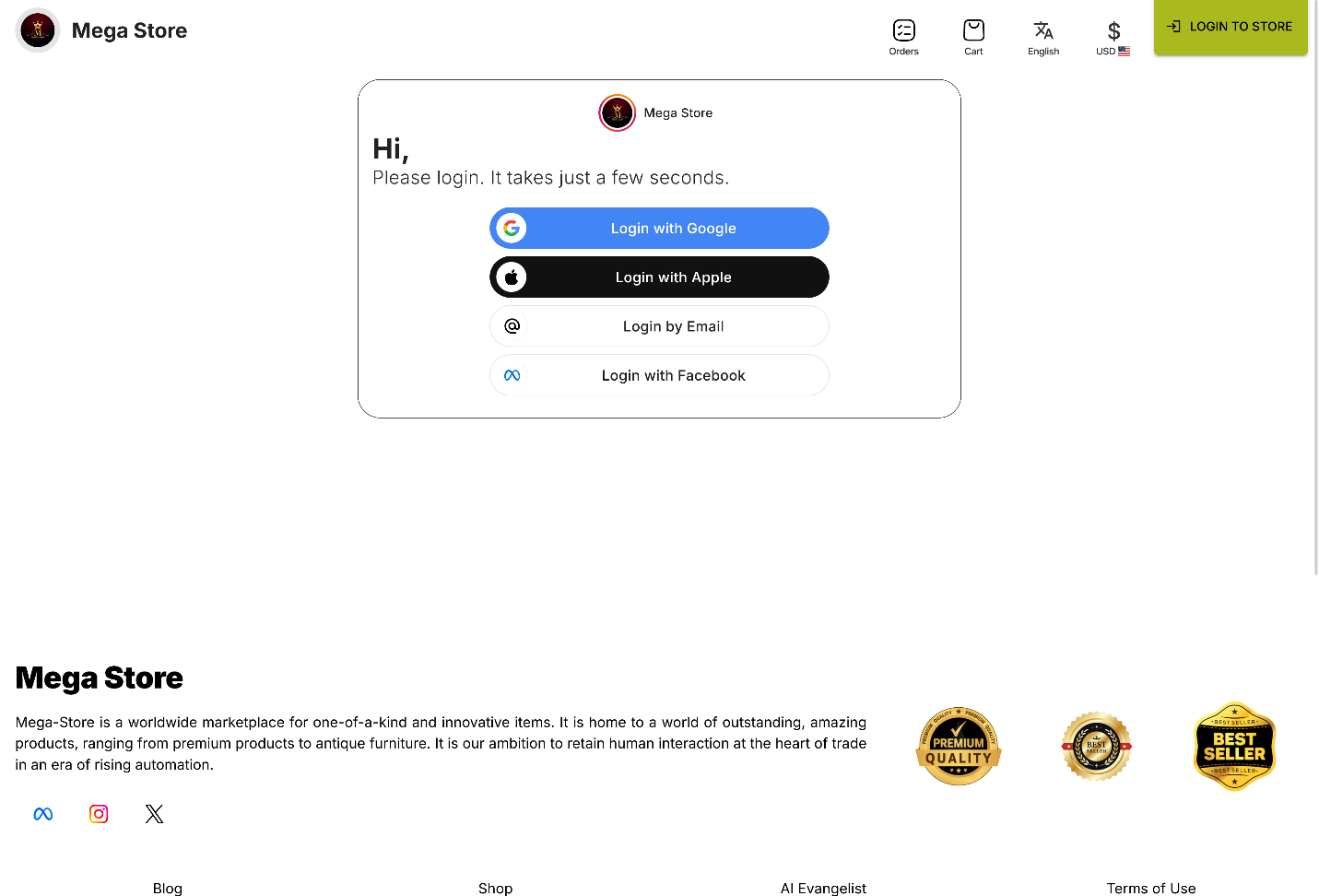
Selldone has answered a much-requested feature: a stand-alone login page for your customers. This means you can send users to yourdomain/welcome for quick sign-ins or account creations, making the entire access process seamless.
How to Implement
- Easy Linking: If your hypothetical brand is found at mycoolstore.com, simply use mycoolstore.com/welcome as your login link.
- Flexible Placement: Add this to your primary menu or footer for extra visibility.
- Better User Flow: Reduces clicks and helps new visitors find the sign-in or account creation form without hunting around your site.
Sample Use Case
Imagine you’re running a membership-based store that offers monthly subscriptions. A well-placed login link not only saves your customers time but also reinforces that they’re joining a welcoming community.
Bulk Removal of Duplicate Products
Why Duplication Happens
Over time, product listings can accidentally multiply—maybe you experimented with different SEO strategies or uploaded a CSV file multiple times. Duplicate entries clutter your storefront and can confuse customers.
A Powerful Clean-Up Tool
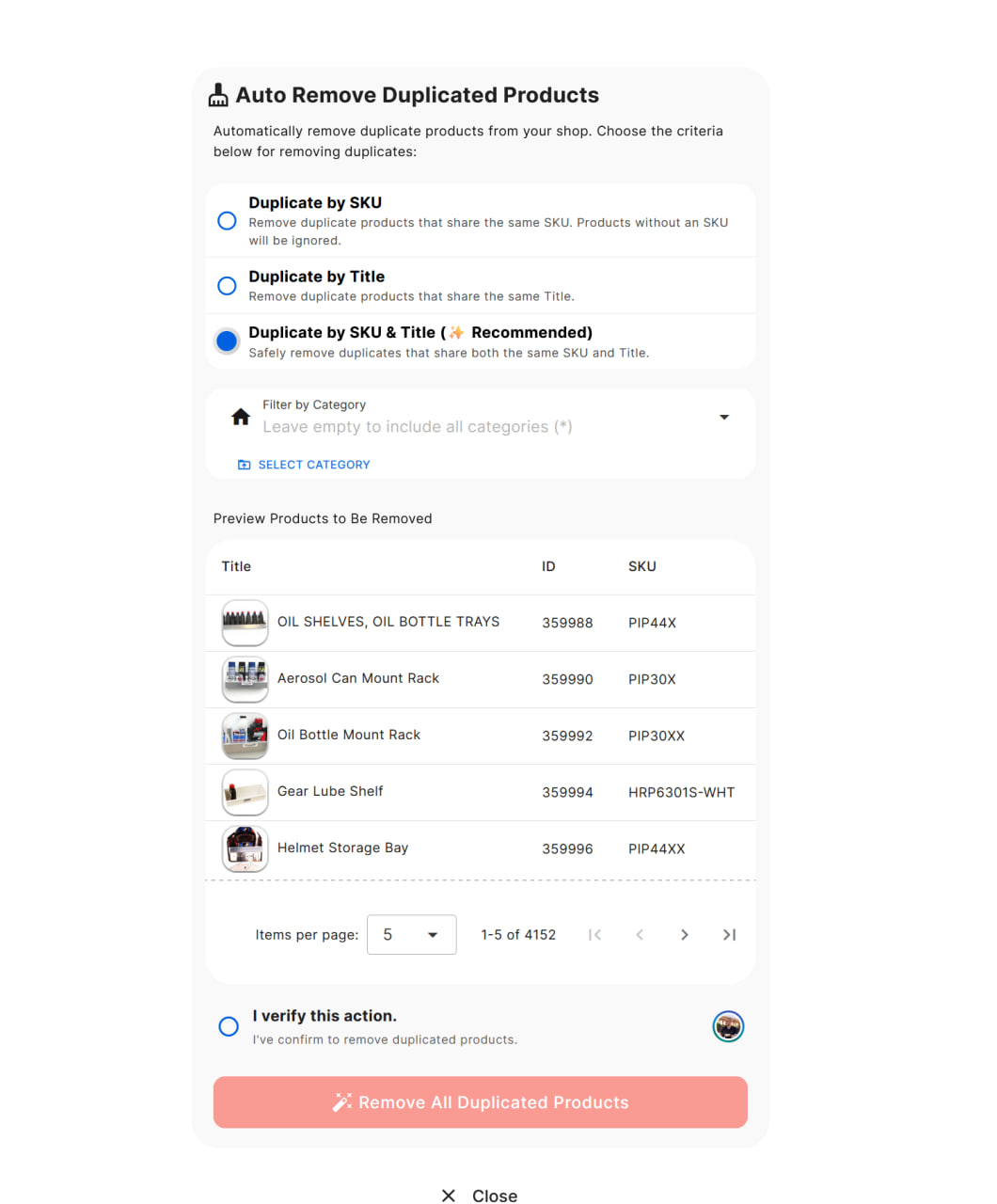
Three Duplicate Criteria:
- SKU: Targets items that share the same SKU.
- Title: Focuses on titles that are exact matches.
- SKU & Title: Best of both worlds, ensuring only genuine duplicates get removed.
Optional Category Filter: Pinpoint duplicates in a specific category if you’d like to be extra cautious.
Step-by-Step Removal
- Go to Shop Dashboard > Products.
- Click the 3-horizontal dots on the top left and select Advanced Options.
- Choose Remove Duplicate Products and pick your removal criteria.
- Preview the products slated for removal, then confirm to tidy up your listings.
Reminder: It’s wise to test in a single category before you remove duplicates across your entire catalog.
In-Platform Video Uploads
Why Videos Are Essential
High-quality product videos can be the difference between a sale and a bounce. They showcase product details, usage demos, or even unboxing experiences—especially vital for certain categories where pictures alone don’t do justice.
New Upload Feature in Selldone
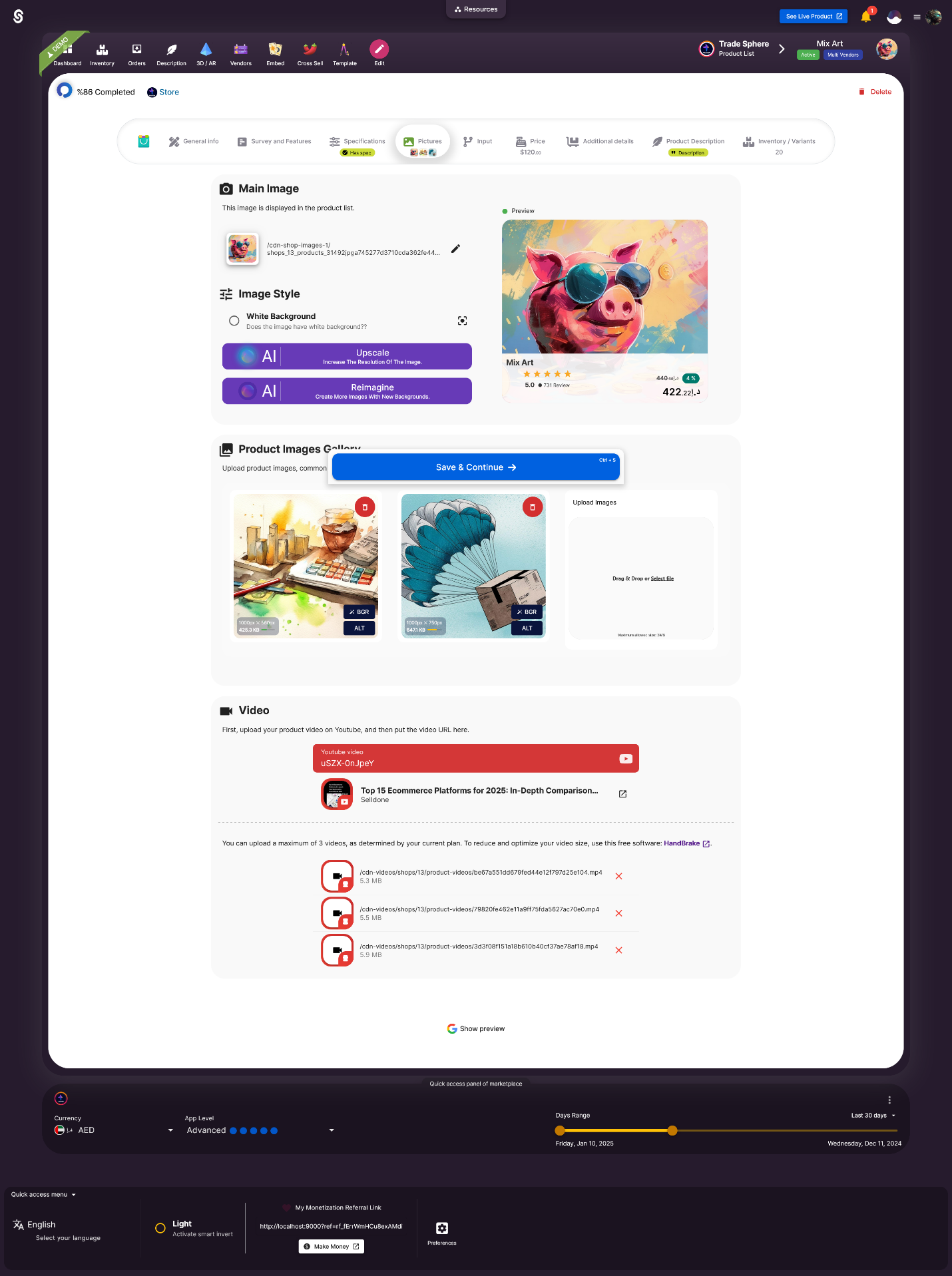
Direct Upload: Place videos under each product’s media section without relying solely on external links.
Flexibility Across Plans:
- Startup License: 1 video per product
- Company License: 2 videos per product
- Enterprise License: 3 videos per product
File Size Limit: Up to 20 MB per video. If you need to shrink your file, free tools like HandBrake can help.
Proving the Value
According to various online retail studies, product pages featuring video content can increase conversions by up to 80%. When used strategically—like showcasing a demonstration or highlighting special features—videos can rapidly boost buyer confidence.
Feature Comparison at a Glance
Below is a quick table summarizing each new enhancement and its primary benefit:
|
New Feature |
Key Benefit |
|
Flexible Variant Displays |
Allows for a more organized, user-friendly listing of product options |
|
Custom Checkout Input Forms |
Collects important buyer data at the time of purchase |
|
Dedicated Login Page |
Offers a straightforward sign-in path, improving overall user experience |
|
Bulk Removal of Duplicates |
Keeps your storefront clean and easy to navigate |
|
In-Platform Video Uploads |
Provides immersive product showcases for higher engagement |
I’m genuinely thrilled about how these Selldone updates make online commerce simpler, more efficient, and more visually engaging. From the new variant display modes that cater to both minimal and extensive product options, to the custom input forms that streamline your entire checkout process, these tools can radically transform the way you operate.
If you’re keen to give your hypothetical brand the best chance of success, diving into these Selldone features is a must. Head to your Selldone dashboard, experiment with the new options, and see for yourself how they can enhance your storefront. I’m always eager to hear success stories—so if you find these improvements particularly helpful, feel free to share your thoughts in the Selldone Community.
Stronger storefronts start with savvy upgrades. Implement these new capabilities today, and watch your store become more organized, user-friendly, and engaging than ever before!
 Add Comment
Make Your Business Online By The Best No—Code & No—Plugin Solution In The Market.
30 Day Money-Back Guarantee
Create Your E-commerce Store Start now — it's freeSay goodbye to your low online sales rate!
FAQ
What is the Smart Mode for variant displays?
Smart Mode is a user-friendly display style that organizes product variants into individual, clickable options. It's perfect for items with fewer variations, like T-shirts in Small, Medium, and Large sizes or a coffee blend available in different weights. This ensures customers can quickly see and select their desired option without being overwhelmed.
Can I customize the checkout process with additional fields?
Yes! Selldone’s custom input forms allow you to add specific fields to the checkout process. Whether you need customer ID details, personalized gift notes, or special delivery instructions, you can easily gather the information you need to streamline operations and serve your customers better.
How do I redirect users to a dedicated login page?
You can use the link yourdomain/welcome to redirect users to a dedicated login page. Add this link to your menu or footer for easy access, providing a seamless sign-in experience for your customers.
How does the bulk duplicate removal feature work?
The bulk duplicate removal tool identifies and deletes products based on SKU, title, or both. It helps keep your shop organized by removing duplicate listings, ensuring a clean and professional storefront. You can even filter by category to apply this action selectively.
Can I upload videos directly to my products?
Yes! Selldone now supports direct video uploads. Depending on your plan, you can upload up to 3 videos per product (20 MB each). Showcase your products more effectively with engaging demos, tutorials, or highlight reels to boost conversions.
How can I make my product pages more user-friendly?
To improve user experience on your product pages, focus on clear organization and navigation. Use features like Selldone’s Smart Mode or Select Mode for variant displays to keep your pages clean and intuitive. Clear images, concise descriptions, and easy-to-select options are key to boosting conversions.
Are product videos really necessary?
Absolutely! Videos are one of the most engaging ways to showcase your products. They provide a closer look at features, demonstrate usage, and create a stronger emotional connection with your audience. Selldone’s direct video upload feature makes it easy to add up to three videos per product, depending on your plan.
What is the best way to display a large number of product variations?
When you have a wide range of options, use dropdown menus to keep your product pages clean and manageable. Selldone’s Select Mode is perfect for this scenario, allowing customers to easily find and select their preferred variations without feeling overwhelmed.
How do I optimize product videos for fast loading times?
Use tools like HandBrake to compress your videos without sacrificing quality. Stick to recommended file sizes (Selldone supports up to 20 MB per video) and formats like MP4 for compatibility. Fast-loading videos improve customer experience and prevent potential buyers from leaving your site prematurely.